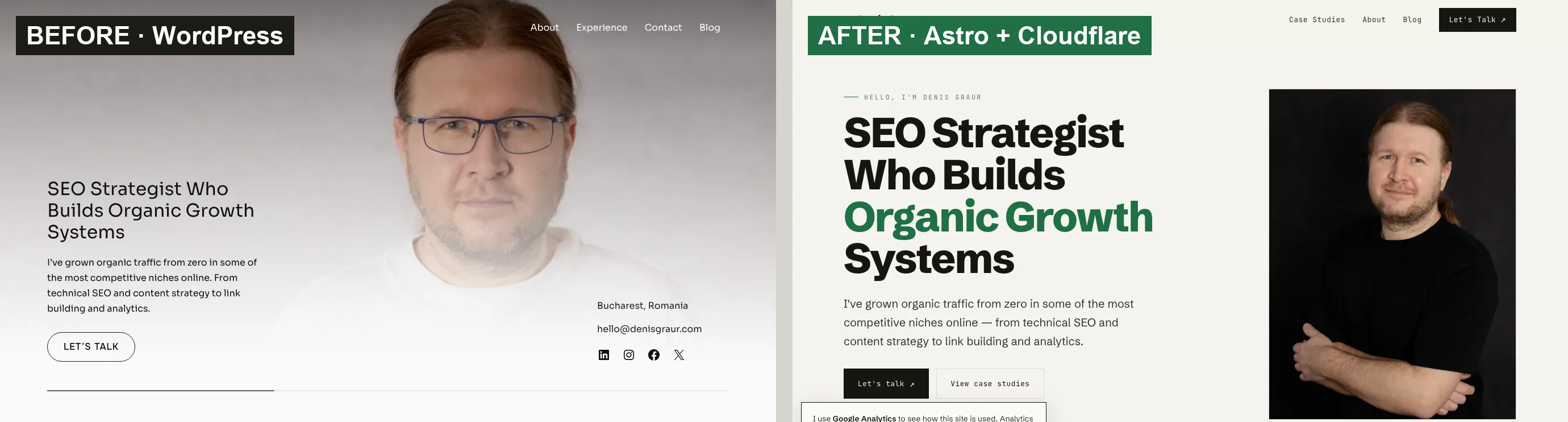
For years my site ran on WordPress, and it was fine. It worked, it was reasonably fast, and I had no real complaint. So this rebuild did not start as a fix for a problem. It started as an experiment: I wanted to try running my site on something other than WordPress, and to see whether I could design and build the whole thing with AI and still be happy to put my name on the result.
So one weekend I did. denisgraur.com is now a static Astro site served by Cloudflare, designed and built almost entirely with two AI tools: Claude Design for the look and Claude Code for the implementation. This is the practical account of how it went.
The short version:
- Page weight dropped from 1,339 KB to 312 KB, about 77% lighter
- Requests fell from 44 to 11
- Speed Index went from 4.2s to 1.1s
- Lighthouse Performance and SEO both reached 100
- The website is free to host
- Nothing to update, no plugins to patch
- Rankings held: same URLs, redirects in place, schema rebuilt
WordPress was not broken. It scored a respectable 94 out of 100 on Google’s Lighthouse performance test. But the new setup is faster and far lighter, it is free to host, and I control every line of the output, which is what I care about as an SEO.
One caveat before the rest. A weekend was only enough because I was not starting from nothing. The site already existed, the words were written, and this was a redesign, not a design from a blank page. Claude had the old site to work from for structure and copy, which is a very different job from inventing one. Start cold and it takes longer.
Why I rebuilt it
Curiosity, mostly, about two things.
One was the stack. After years on WordPress I wanted to know what it was like to work without it: no theme, no plugins, no database, just files I control. Astro had been on my radar for a while, and the nudge to actually try it came from Joost de Valk, the founder of Yoast SEO, who moved his own site off WordPress onto Astro and wrote a guide to SEO on Astro. His argument was that everything Yoast does for you, you can do yourself in Astro, because you control the full HTML output. When the person behind the most-used SEO plugin leaves WordPress for static files, it is worth a look.
The other was the tooling. I am not a developer; my old WordPress site ran on a ready-made theme. The real question was whether Claude Design and Claude Code had come far enough to take a project from a look to a live site, with me directing the work rather than a developer building it. A personal rebuild was a low-risk way to find out, and the result would either be something I was happy to put my name on or a useful lesson in where the tools still fall short.
What WordPress was costing me
WordPress is good software. It runs a large part of the web, and for plenty of projects it is still the right choice. My old site worked fine.
The cost was in the upkeep and the overhead. There was always something to update: core, plugins, the theme, each one a small task and a small risk. Every plugin was code I did not write, running on a server and exposed to the web, which is a lot of surface area for a site that is mostly a handful of pages. The theme and its plugins also shipped CSS and JavaScript for features I never used, which is how a portfolio page ends up at 44 requests and 1.3 MB. And when I wanted exact control over the HTML, the schema, or a single meta tag, I was usually working around the theme or reaching for another plugin.
If I published daily, or had non-technical people editing the site, that upkeep would be a fair price to pay. But my site changes rarely, and I am comfortable editing Markdown and using Git. For the way I actually use it, the maintenance and the overhead were buying me very little.
The new stack, and why I like it
Here is what replaced it:
- Astro builds the whole site into static HTML ahead of time. The content lives in Markdown files inside the repository, with a typed schema, so there is no database and every change is a normal Git commit.
- Cloudflare serves those files from its global network.
- The only dynamic part, the contact form, runs on a small Cloudflare Worker, about 150 lines of TypeScript. The same Worker also handles my redirects. There is no server framework and no SSR adapter, because only one route needs server logic. Keeping everything else static also kept Astro’s build-time image optimisation working. A deploy is one command or a Git push, and the full site builds in roughly a second.
For me this is close to ideal. I control every byte of HTML, so the schema, canonicals, and meta are exactly what I decide. Static files from a CDN are very hard to beat on speed, with no rendering or database query in the request path. There are no plugins to patch.
What “free” actually means here
People assume free hosting has a catch, so let me be specific. Cloudflare’s Workers free plan includes 100,000 requests a day. Static files are served from their CDN, and SSL certificates and DNS are free too. A personal or small-business site will not get near those limits. The contact form sends through Resend, whose free plan covers 3,000 emails a month, and spam is screened by Cloudflare Turnstile, which is also free. So serving the website costs nothing, and not in the trial sense. Normal traffic does not push it past any of those tiers.
The one exception is email. My mailboxes on this domain still run on the old cPanel host, so I have kept a small plan there for now. The website itself no longer needs that host, and email could move to a dedicated provider later, but it was not worth the disruption during the rebuild.
The build itself was not quite free, but close. Both Claude Design and Claude Code run on the Claude Max subscription I already pay for, so beyond my own time the rebuild added no new tooling cost and no other paid developer tools.
Migrating without losing rankings
This is where platform moves usually leak traffic, and it is the part I cared about most. A rebuild only counts if search engines notice nothing except that the pages got faster.
What I held myself to:
- Identical URLs, trailing slashes included. Same paths and structure, so almost nothing needed a redirect at all.
- 301 redirects for the few URLs that did move. I pulled the case studies out of
/blog/into/case-studies/, and the Worker redirects the old paths permanently, so their links and authority carry over. - The same canonical host. I kept
wwwrather than flipping to the apex, so I was not resetting signals. - Structured data written by hand:
PersonandWebSiteon the homepage,BlogPostingandBreadcrumbListon articles. It contains exactly what I chose to include, and nothing I did not. - A sitemap and robots.txt regenerated on every build, so they cannot fall out of sync.
- Open Graph and Twitter tags kept for sharing.
The result was the uneventful kind you want from a migration: the URLs still resolve, the redirects do their job, and the rankings have not moved.
Designing it with Claude Design
The build came together in two passes. First, Claude Code ported the existing site into Astro, keeping its design, so the whole thing worked end to end: pages, content, the blog, the contact form. The old WordPress site was already an editorial layout, a white page with a portrait and a single teal accent, so the design pass with Claude Design was a refinement, not a rebrand. It warmed the background from white to cream, moved the accent from teal to green, added a small brand mark, and cleared the contact details and other clutter out of the hero. The same direction, pushed further.
The structure changed as well. The old site was one long page plus a blog; the new one splits into separate pages: Home, About, Case Studies, and Contact, so each can target its own search intent instead of one URL doing everything. On the old site, About and Contact were just sections you scrolled to, and Experience folded into the new About page.
It worked as a loop rather than a handoff. Each change started as a standalone HTML mockup I could open and judge with fresh eyes. I kept what worked and reversed what did not, and once a direction was settled, Claude Code ported it into the real Astro components, keeping the previous version so nothing was a one-way door.
Building it with Claude Code
Building a website with AI gets caricatured two ways: frictionless no-code where you click a few buttons, or reckless “vibe coding” where you ship whatever the model produces. This was neither. What it actually is sits in between: you direct a capable agent, and you check its work.
The agent was Claude Code. It works inside the codebase: reading and editing files, running commands, and deploying. I describe what I want in plain language, it implements the change across the project, and nothing lands without my review. That is how a non-developer ends up with real features rather than just pages. The contact form, the redirects, and the analytics setup (Cloudflare Web Analytics, which uses no cookies and stores nothing on your device) were all built this way. I could not have written any of them myself.
The checking is not a formality. It is where the judgment lives, because a capable agent moving fast can be confidently wrong, and on a migration the cost of missing something is real. The closest call of the whole project was email: a setting in the DNS would have routed messages for @denisgraur.com to the web server instead of the mail server, and my inbox would have quietly stopped receiving, with no error to warn me. It surfaced while planning the cutover, in time to fix the routing first. Nothing about that was automatic. It needed someone who knew to look.
What kept the whole thing from feeling reckless is that every change is tracked. Each one is a Git commit, so the site has a single history and any step can be undone. That is the honest answer to “an AI built your site”: it did the building, but every decision passed through me, and every change is on the record. Directed and checked, not generated and hoped for.
The numbers
I measured the live WordPress site on its old host and the new site the same way, so this compares the two setups fairly:
| Metric | WordPress (old) | Astro + Cloudflare (new) |
|---|---|---|
| Lighthouse Performance | 94 | 100 |
| Lighthouse SEO | 92 | 100 |
| Page weight | 1,339 KB | 312 KB |
| Requests | 44 | 11 |
| Speed Index | 4.2s | 1.1s |
| Largest Contentful Paint | 2.4s | 1.6s |
| First Contentful Paint | 1.8s | 1.1s |
To be fair, WordPress scored 94, so this is not a rescue story. The real gains are structural: 77% less weight, a quarter of the requests, and a page that fills in about four times faster, on top of the perfect scores.
One number is worth sitting with, because it shows the work did not stop at “it is static, so it is fast.” The first mobile Performance score was 80, dragged down by a render-blocking stylesheet and a 4.4-second Largest Contentful Paint. Two targeted fixes took it to 100: inlining the small CSS file, which cut LCP to 1.6 seconds, then deferring the analytics script so it loads after first paint instead of competing with it. Both came from reading the report, not guessing. Inlining all of your CSS only works because this site’s is small; on a larger one you would inline the critical part and defer the rest. And to be fair to WordPress, you could make the same fixes there, usually with a performance plugin; here they were a few lines of config rather than more plugins to maintain.
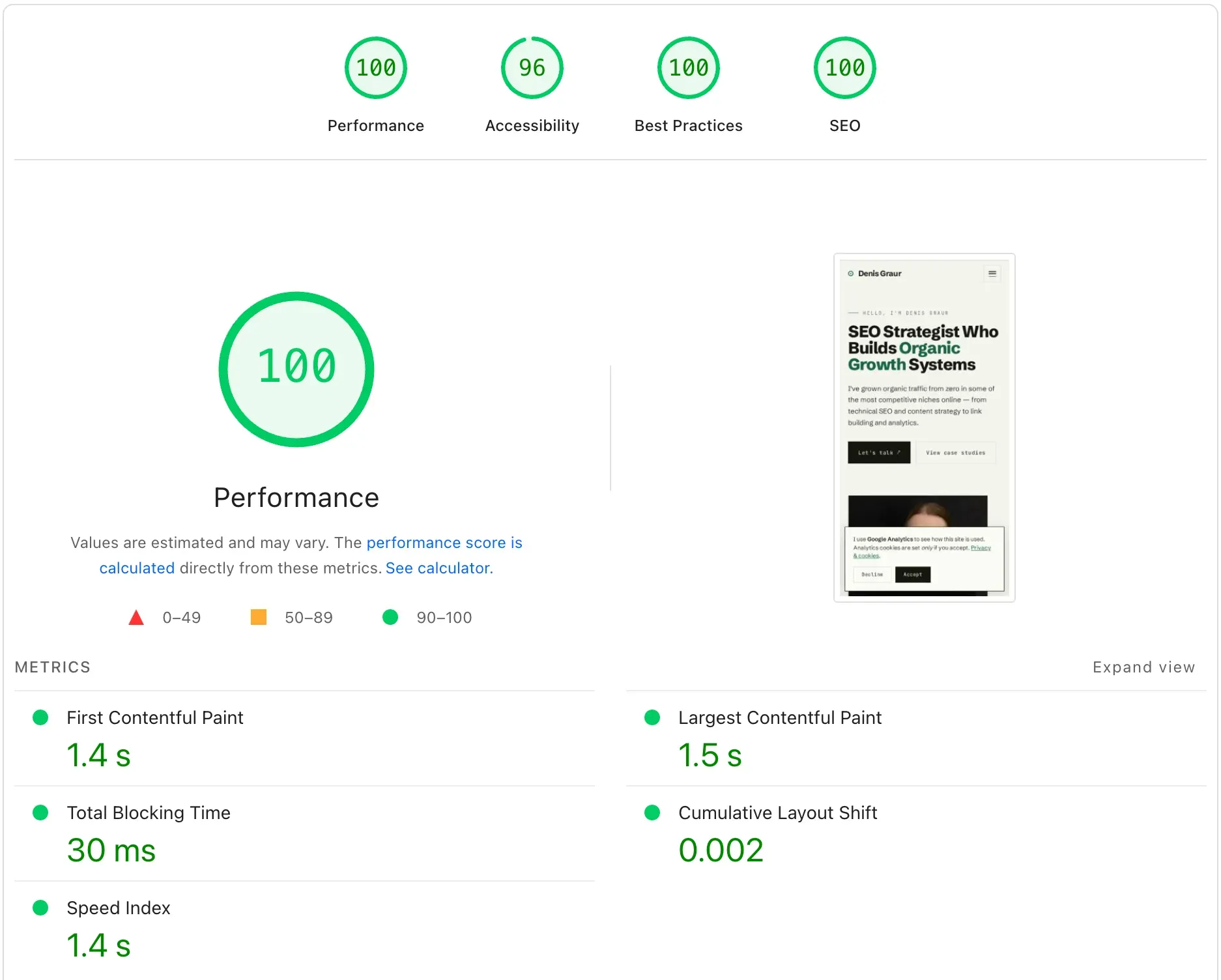
The rebuilt site on Google PageSpeed Insights, mobile.
Should you do this?
This stack suits portfolios, marketing sites, documentation, landing pages, and blogs. Content that changes now and then, edited by someone comfortable with Markdown and Git.
It is the wrong choice if non-technical people publish every day, if you need complex dynamic features like memberships or a store, or if a team needs a familiar CMS. WordPress or a headless CMS still wins there.
Building this way turned what would have been weeks into a few days. But it only pays off if you can direct the tool and catch its mistakes. You have to know what good looks like, and notice when something only looks right. Do that, and it is the most useful thing I have picked up in years. Skip it, and the tool will confidently hand you work that looks finished and is not.
The proof is the page you are reading
This site is the result. It is static, fast, free to host, and mine to change whenever I want. The design and the build were one long conversation with Claude, and every call in it was mine.
If you want the same, a fast, clean rebuild that holds its rankings, with or without the AI part, get in touch. Or see how I have grown organic traffic from zero in some hard niches.